Redshift SubDAG
S3 Data Lake에 준비 된 DW 데이터를 최종적으로 Redshift로 로딩하기 위한 DAG 오브젝트를 구성합니다.
Redshift로 데이터를 로딩하는 작업은 각 테이블 별로 수행해야 하는 반복적인 패턴이므로 Main DAG를 단조롭게 하기 위해 Sub DAG를 구성합니다. 따라서, Redshift의 각 테이블을 truncate 쿼리로 데이터를 비우는 작업과 Copy 쿼리로 S3 파일을 Redshift로 로딩하는 작업을 하나의 DAG 오브젝트로 구성하겠습니다.
- 다음 스크립트를 Cloud9 workspace로 copy/paste하여 dags/chinookSubDAG 폴더 안에
chinook_redshift_subDAG.py를 생성 하십시오.
from airflow.models import DAG
from airflow.models import Variable
from airflow.providers.amazon.aws.transfers.s3_to_redshift import S3ToRedshiftOperator
from airflow.providers.postgres.operators.postgres import PostgresOperator

# Airflow connections
AWS_CONN='aws_default'
REDSHIFT_CONN='redshift_conn'

# Airflow UI variables
DATALAKE_BUCKET=Variable.get('DATALAKE_BUCKET')
DWH_DB=Variable.get('DWH_DB')

table_list = [ 'dim_track', 'dim_customer', 'dim_invoice', 'dim_date', 'fact_invoice' ]

# Helper Function: Returns DAG that load S3 data to Redshift
def load_redshift_table_subdag(parent_dag_name, child_dag_name, default_args):

    with DAG(
        dag_id='%s.%s' % (parent_dag_name, child_dag_name),
        default_args=default_args
    ) as dag:

        for table_name in table_list:
            t1 = PostgresOperator(
                    task_id=f'truncate_{table_name}_table',
                    sql=f'TRUNCATE TABLE {DWH_DB}.{table_name};',
                    postgres_conn_id='redshift_conn'
                )

            t2 = S3ToRedshiftOperator(
                    task_id=f'load_{table_name}_to_redshift',
                    redshift_conn_id=REDSHIFT_CONN,
                    aws_conn_id=AWS_CONN,
                    s3_bucket=DATALAKE_BUCKET,
                    s3_key=f'dwh/{table_name}/',
                    schema=DWH_DB,
                    table=table_name,
                    copy_options=['format as parquet']
                )

            t1 >> t2

    return dag
-
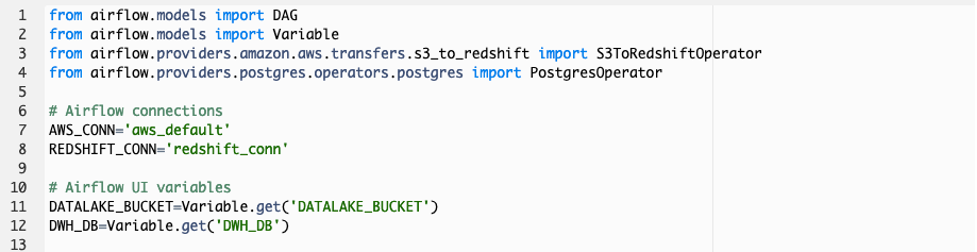
스크립트 구성을 살펴 보겠습니다. 먼저 DAG를 구성하기 위해 필요한 Airflow library를 import 합니다. 특히 S3에서 Redshift로 데이터를 로딩하는 작업과 Redshift 쿼리를 수행하는 작업을 위해 S3ToRedshiftOperator와 PostgresOperator library가 사용 됩니다. 그리고 Airflow 작업이 AWS 서비스와 연결 하기 위해 기본적으로 제공되는 aws_default 연결과 새로운 redshift_conn 이름의 연결을 사용합니다. 또한 Airflow UI에 정의 된 Variables (변수)를 Global 변수로 선언하여 사용합니다.
-
load_redshift_table 함수는 S3 Data Lake에 준비 된 DW 데이터를 Redshift로 로딩하기 위한 DAG 오브젝트를 구성합니다. 첫번째 PostgresOperator는 Redshift 테이블에 중복 데이터가 저장되지 않게 하기 위해 truncate table 쿼리를 수행하여 데이블을 비우기 위한 작업을 정의합니다. S3ToRedshiftOperator는 S3 Data Lake에 준비 된 DW 데이터를 Redshift 테이블로 로딩하기 위한 작업을 정의합니다.
각 테이블 별로 truncate_<table_name>_table, load_<table_name>_to_redshift 이름의 작업이 Airflow DAG에 생성 됩니다.

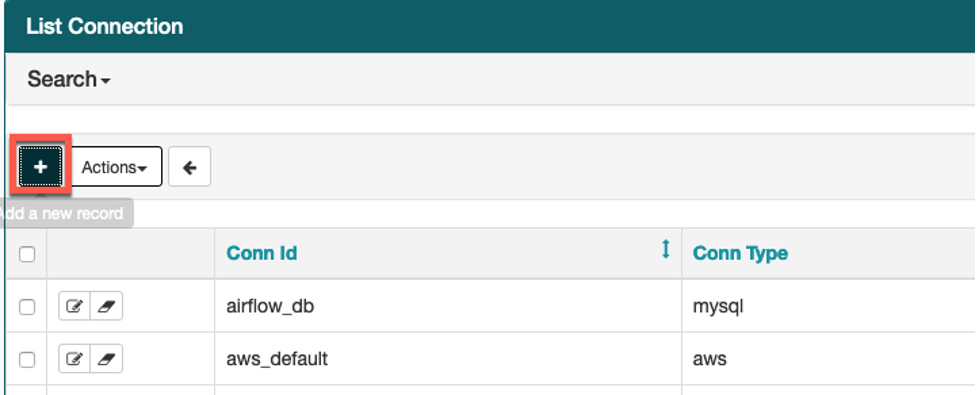
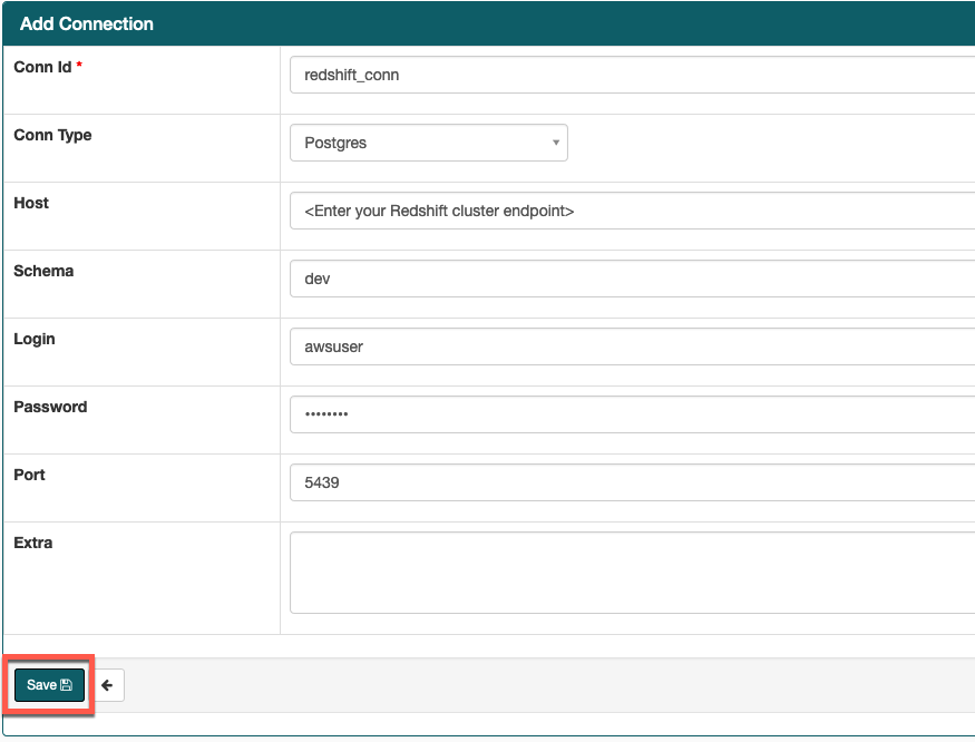
- Airflow UI의 Admin->Connections 화면으로 가서 스크립트에 필요한 Redshift connection을 다음 테이블의 정보를 참조하여 생성하십시오.
Airflow connection을 생성하기 전에 <your_redshift_cluster_endpoint> 문구는 Cloudformation stack의 Output 탭에 출력 된 RedshiftClusterEndpoint로 변경해야 합니다.
| Key | Val |
|---|---|
| Conn Id | redshift_conn |
| Conn Type | Postgres |
| Host | <your_redshift_cluster_endpoint> |
| Schema | dev |
| Login | awsuser |
| Password | Welcome1 |
| Port | 5439 |